Cynira mobile app — SMS consent screen
This page is a faithful reproduction of the in-app opt-in screen shown to every user during account onboarding (source: src/screens/ConsentScreen.tsx), hosted here for A2P 10DLC campaign review since the native mobile app itself is not otherwise publicly browsable. Full source: Terms of Use (see "Text Messaging (SMS) Program") / Privacy Notice.
How users opt in
- The user creates a Cynira account in the Cynira mobile app (iOS/Android).
- The user enters their mobile number and verifies it with a one-time code.
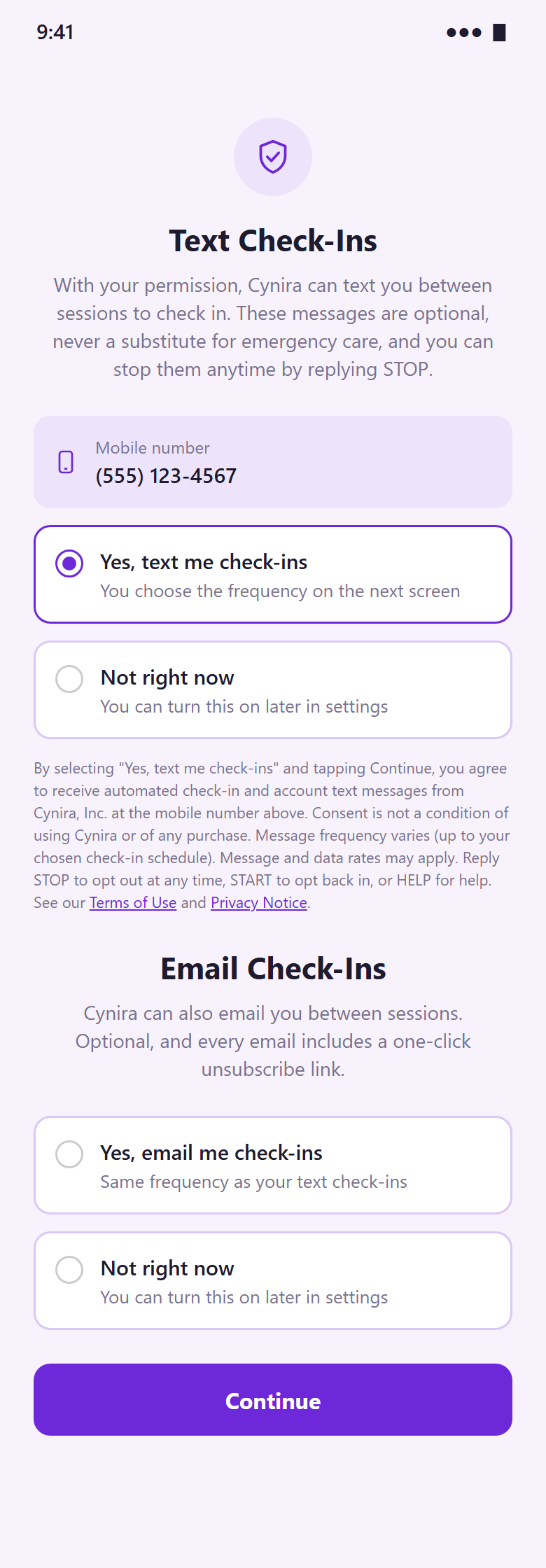
- On the Text Check-Ins screen below, the user selects "Yes, text me check-ins" (nothing is pre-selected) and taps Continue. Choosing "Not right now" means no check-in texts are sent.
Opt-in screen image
Mock-up of the in-app Text Check-Ins screen, rendered to match the app's layout and wording exactly (example phone number shown; "Yes" selected for illustration). Direct image link: https://cynirahealth.com/sms-consent.png
Screen contents
Text Check-Ins
With your permission, Cynira can text you between sessions to check in. These messages are optional, never a substitute for emergency care, and you can stop them anytime by replying STOP.
Mobile number
(555) 123-4567 (the number the user just verified)
Yes, text me check-ins
You choose the frequency on the next screen
Not right now
You can turn this on later in settings
Neither option is pre-selected - continuing without an explicit choice is blocked.
By selecting "Yes, text me check-ins" and tapping Continue, you agree to receive automated check-in and account text messages from Cynira, Inc. at the mobile number above. Consent is not a condition of using Cynira or of any purchase. Message frequency varies (up to your chosen check-in schedule). Message and data rates may apply. Reply STOP to opt out at any time, START to opt back in, or HELP for help. See our
Terms of Use and
Privacy Notice.
Continue
Operated by Cynira, Inc., a Delaware corporation. Contact: cynirasupport@gmail.com.